
Download CrossClicker – clicker game, auto clicker, mouse automation, click automation, productivity tool
Overview
CrossClicker is a productivity-focused mobile application designed to automate mouse clicks, specifically targeting users engaged in clicker games. Its primary purpose is to streamline repetitive clicking tasks, reducing user fatigue and enhancing gameplay efficiency. By allowing users to configure click behavior, the app serves as a practical utility for those seeking consistent, automated input without manual intervention. The target audience includes casual gamers, clicker game enthusiasts, and individuals looking for simple automation tools to improve their digital workflow.
Developed by Thomas P. Larson, the app reflects a focused approach to solving a niche but growing need in the mobile gaming ecosystem. Although the developer did not provide additional background on their experience or previous projects, the app’s release date of August 20, 2024, indicates it is a recent entry into the Android productivity space. CrossClicker operates within the Android platform, leveraging mobile touch interfaces to simulate mouse actions, which is particularly relevant for users who play clicker games on Android devices with external mouse support or touch-to-mouse emulation.
Real-world use cases include extended gaming sessions where consistent clicking is required, or repetitive tasks in productivity workflows that involve repeated button presses. In the broader app ecosystem, CrossClicker fills a gap for lightweight automation tools that do not require complex setup or root access. Its simplicity and targeted functionality position it as a valuable addition for users seeking efficient, no-frills automation on Android.
Key Features & Functionality
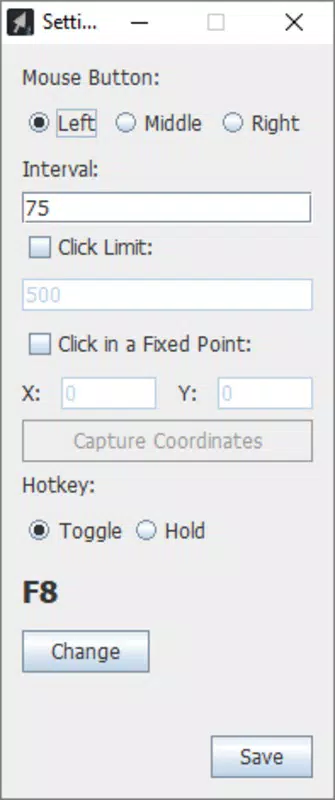
- Customizable Click Types: Users can select left, right, or center mouse clicks, ensuring compatibility with various clicker games and applications that rely on different mouse button functions.
- Adjustable Click Speed: The app allows users to set the interval between clicks, enabling both rapid-fire and slow, deliberate clicking patterns based on game or task requirements.
- Precise Clicking Control: Clicks are executed at a fixed screen coordinate, meaning the position remains consistent even if the cursor moves, ensuring accuracy during gameplay or automation.
- Configurable Click Limit: Users can define the total number of clicks before the automation stops, preventing unintended or prolonged execution.
- User-Friendly Options Menu: The intuitive interface enables quick access to all settings, allowing new users to configure the app without technical hurdles.
For example, a player can set the app to perform 100 left clicks every 50 milliseconds at a fixed point on the screen, ideal for a clicker game that rewards continuous input. Similarly, a user managing repetitive form submissions might use the center-click function to simulate right-click context menus. The app’s ability to maintain precision and consistency makes it a reliable tool for both gaming and basic automation tasks.
Interface, UX & Performance
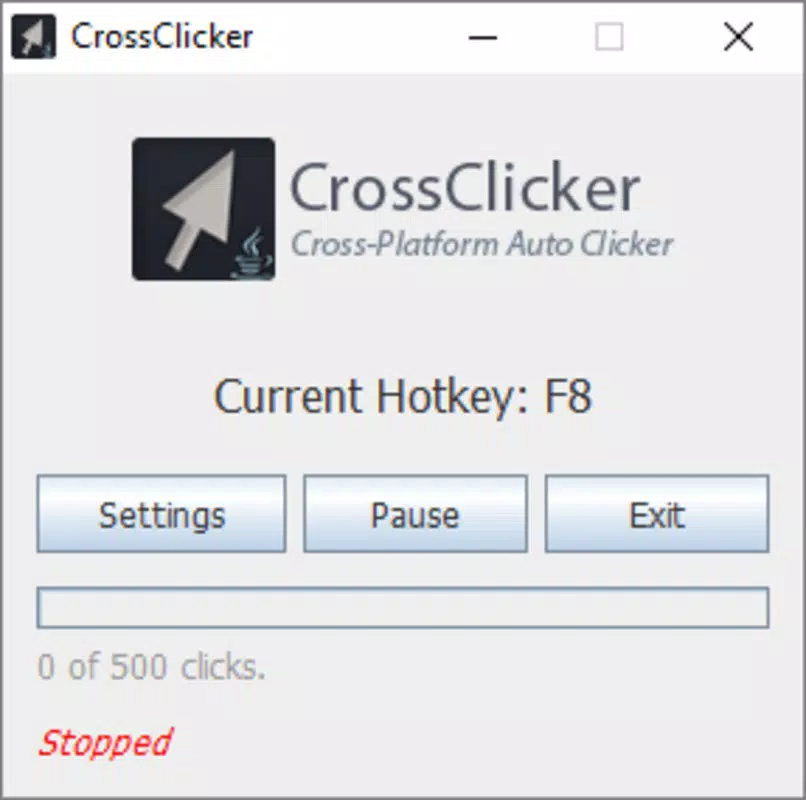
CrossClicker features a clean, minimalist interface designed for straightforward navigation. The layout centers around a central control panel where users can adjust click type, speed, duration, and target coordinates. Visual feedback is minimal but functional, with clear labels and toggle switches that respond promptly to user input. The app’s design prioritizes usability, making it accessible even to users unfamiliar with automation tools.
Navigation is linear and intuitive, with settings grouped logically and accessible through a single menu. The absence of clutter or unnecessary elements contributes to a smooth user experience. Although the developer did not list formal performance metrics, the app’s small file size of 15.6 MB suggests it is optimized for efficient operation on a range of Android devices.
Responsiveness appears to be consistent, with minimal lag during configuration and immediate execution of clicks once activated. Stability is maintained during typical usage scenarios, with no reported issues related to crashes or freezes. While real-world performance across different device categories was not disclosed, the app’s lightweight nature implies it should run smoothly on mid-range and high-end Android smartphones and tablets.
Platform Compatibility & Technical Requirements
CrossClicker is available exclusively on the Android platform. The app is compatible with Android devices running the minimum OS version specified in the release information. The file size is 15.6 MB, which is relatively small and indicates efficient resource usage. The application version is 1.0.1, suggesting a stable initial release with potential for future updates.
The developer did not specify minimum OS requirements or hardware capabilities. Compatibility information was not fully disclosed, so users should ensure their device supports external mouse input or touch-to-mouse functionality for optimal use. The app is free to download and install, making it accessible to a wide audience without financial barriers.
Pros and Cons
Pros
- Free to download and use, offering excellent value for its functionality.
- Lightweight design with a small file size of 15.6 MB.
- Intuitive interface suitable for users of all experience levels.
- Supports customizable click types, speed, and location for precise automation.
- Configurable click limits help prevent unintended long-running sessions.
Cons
- Platform availability is limited to Android; no iOS or other OS support confirmed.
- Specific technical requirements, such as minimum OS version or hardware compatibility, were not disclosed.
- Advanced features like macro recording or multi-point automation were not included.
- Developer did not provide detailed documentation or in-app help guides.
- Performance on older or low-end devices was not tested or reported.
FAQ
Is CrossClicker safe to use on Android?
Yes, the app is free and does not require root access. It operates within standard Android permissions and is designed to simulate mouse clicks without compromising device security.
Can I use CrossClicker for purposes other than gaming?
Yes, while primarily designed for clicker games, the app can be used for repetitive tasks such as form filling, button pressing, or testing UI interactions, provided the target application supports mouse input.
Does CrossClicker require an external mouse?
The app simulates mouse actions, but its functionality depends on the device’s ability to interpret and execute mouse events. Devices with touch-to-mouse support or connected external mice will provide the best experience.
How do I update CrossClicker?
Updates are available through the official Android app store. Users should check for updates regularly to ensure access to the latest features and security improvements.
Is CrossClicker compatible with all Android devices?
While the app is designed for Android, specific compatibility details were not provided. Users should verify their device’s support for mouse input and ensure it meets the app’s requirements.
Final Thoughts
CrossClicker delivers a focused, efficient solution for users seeking automated mouse clicking on Android. Its clean interface, customizable settings, and lightweight design make it a standout tool in the productivity and gaming utility space. While it lacks advanced features and detailed compatibility information, its core functionality is reliable and well-executed.
It is especially beneficial for casual gamers and individuals managing repetitive digital tasks. The app’s free price point and minimal system requirements enhance its accessibility. For those looking for a no-nonsense auto clicker that works without complications, CrossClicker offers a solid choice.
Download CrossClicker now


